

Our quote tool lets you compare real ACA Marketplace plans for your ZIP code in a few minutes, without creating an account. This guide walks through every screen using one real example, and labels every part of the results page so you know exactly what you are looking at.
Instant Health Help is a licensed insurance agency serving Florida. We are not the Health Insurance Marketplace. The quoting tool is powered by HealthSherpa, a private enrollment platform, and it is not the government Marketplace website.
EXAMPLE QUOTE: WHAT WE SEARCHED
- ZIP: 32837
- Age: 35
- Sex: Male
- Tobacco: Non-smoker
- Household: 1 (no dependents)
- Income: $40,000/yr
Example numbers for this one profile on the day captured. Your price will differ.
Want to keep this guide? Download the PDF version.
Download the PDF guideThese are example numbers. Every price in this guide is for the one profile above, on the day we captured the screens. Your prices will be different because they depend on your ZIP, age, household, income, and tobacco use. Savings shown by the tool are estimates until you apply. In this example only one insurance company showed plans for ZIP 32837; other areas may show more.
The steps at a glance
- Type your ZIP on our homepage and tap Compare plans now.
- Optional: leave your name and phone so a licensed agent can double check your plan, or tap Skip, show plans.
- Tell the tool who needs coverage (age, sex, tobacco use).
- Enter your tax household size and estimated income.
- See your estimated savings.
- If it is outside Open Enrollment, answer the life event question honestly.
- Optional: add your doctors and prescriptions.
- Read your results, open plan details, and call us when you find plans you like.
What to have ready
- Your ZIP code
- The age of each person who needs coverage
- Whether anyone uses tobacco
- How many people are in your tax household (you, your spouse, and anyone you claim on your taxes)
- A careful estimate of your household income before taxes
- Optional: names of your doctors and hospitals, and your prescriptions
When you can use it to enroll
In Florida and other states that use HealthCare.gov, Open Enrollment runs Nov 1 to Jan 15. Pick a plan by Dec 15 for coverage that starts Jan 1. During Open Enrollment anyone can shop and enroll in next year’s plans.
Outside Open Enrollment (including the weeks before Nov 1), you need a Qualifying Life Event to enroll, such as losing other coverage, moving, getting married, or having a baby. The tool will ask about this. Here is how to answer:
- If you had a qualifying life event in the last 60 days, pick it.
- If nothing on the list applies to you, choose None of the above. Then wait for Nov 1, set the reminder email, or call us at (321) 315-0054.
- Never pick a life event that did not happen to you. Your eligibility can be checked when you apply.
Step 1: Type your ZIP on our homepage
Find the card that says Let’s get your plan now on our homepage. It reads: “Compare plans in minutes: type your ZIP and we’ll open real ACA Marketplace plans for your area.”
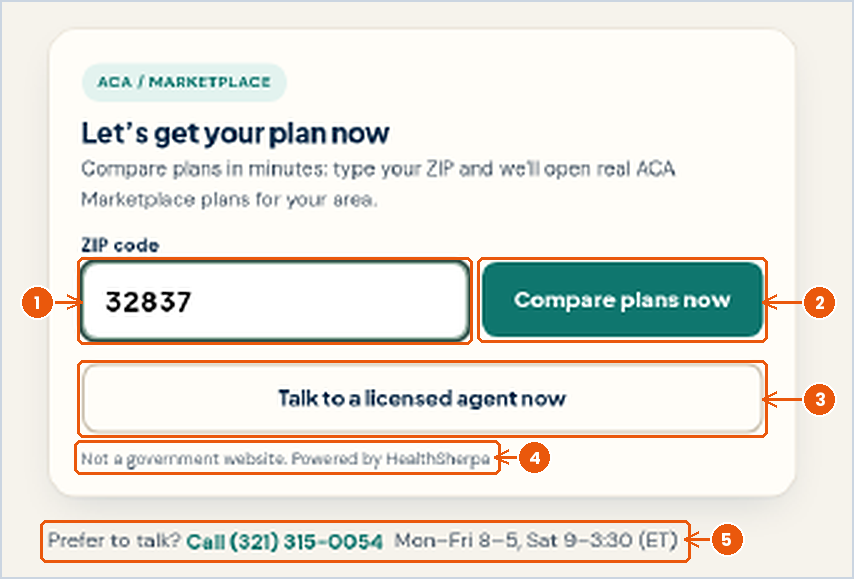
- ZIP code: Type the 5 digit ZIP where you live. Plans and prices depend on your ZIP and county.
- Compare plans now: Opens the quote tool for your area.
- Talk to a licensed agent now: Rather talk it through? This reaches us directly.
- Not a government website. Powered by HealthSherpa: The tool runs on HealthSherpa, a private platform. It is not HealthCare.gov.
- Prefer to talk?: Call (321) 315-0054, Mon to Fri 8 am to 5 pm, Sat 9 am to 3:30 pm ET.
Step 2: Optional, ask an agent to double check
After you tap Compare, a short optional form appears: Want a licensed agent to double-check your plan? (optional). If you leave your first name and phone, a licensed agent from our team can follow up. You do not have to: Skip, show plans is completely fine and takes you straight to the quote.
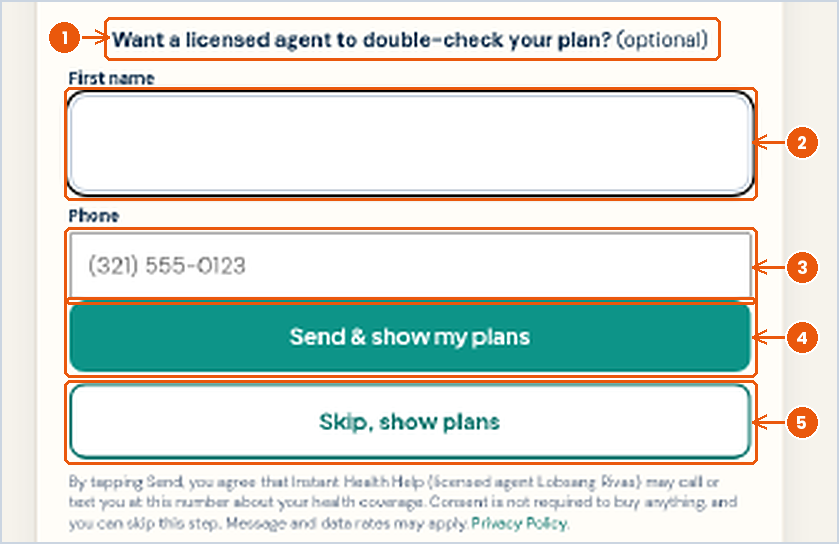
- Want a licensed agent to double-check your plan?: Optional. Nothing here is required to see plans.
- First name: So we know who we are calling.
- Phone: The number where you would like a call or text.
- Send & show my plans: Shares your name and number with us, then opens your plans.
- Skip, show plans: Opens your plans without sharing anything.
Step 3: Tell it who needs coverage
The tool now opens on HealthSherpa. A progress bar at the top shows three stages: Your info, Savings, and Personalize. In our example we entered age 35, Male, and left every box unchecked because he is a non-smoker with no job based or Medicaid coverage.
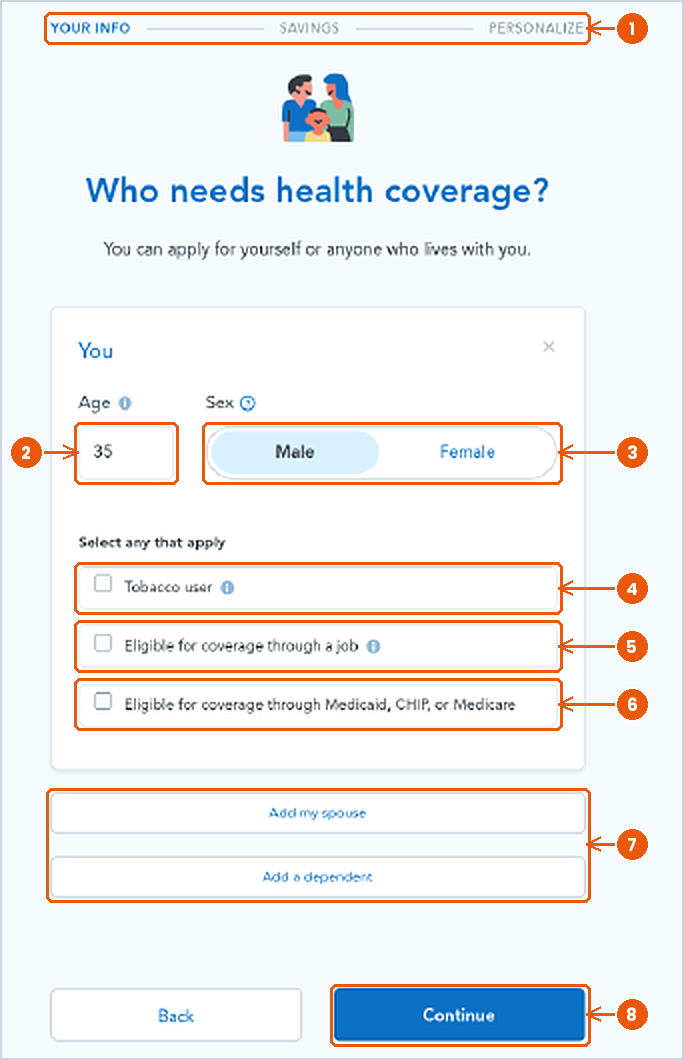
- Progress bar: Your info, then Savings, then Personalize.
- Age: Your age. Premiums go up with age.
- Sex: Male or Female.
- Tobacco user: Check only if you use tobacco. It can raise your premium.
- Eligible for coverage through a job: Check if you can get coverage through your job or a family member’s job. It can affect your savings.
- Eligible for Medicaid, CHIP, or Medicare: Check if this applies. People eligible for these programs usually do not get Marketplace savings.
- Add my spouse / Add a dependent: Add anyone else who needs coverage. Our example has no dependents.
- Continue: Next screen.
Step 4: Household size and income
Your tax household is you, your spouse if married, and anyone you claim as a dependent. Our example is a household of 1 with an estimated income of $40,000 before taxes. Use a careful estimate; you can update it when you apply.
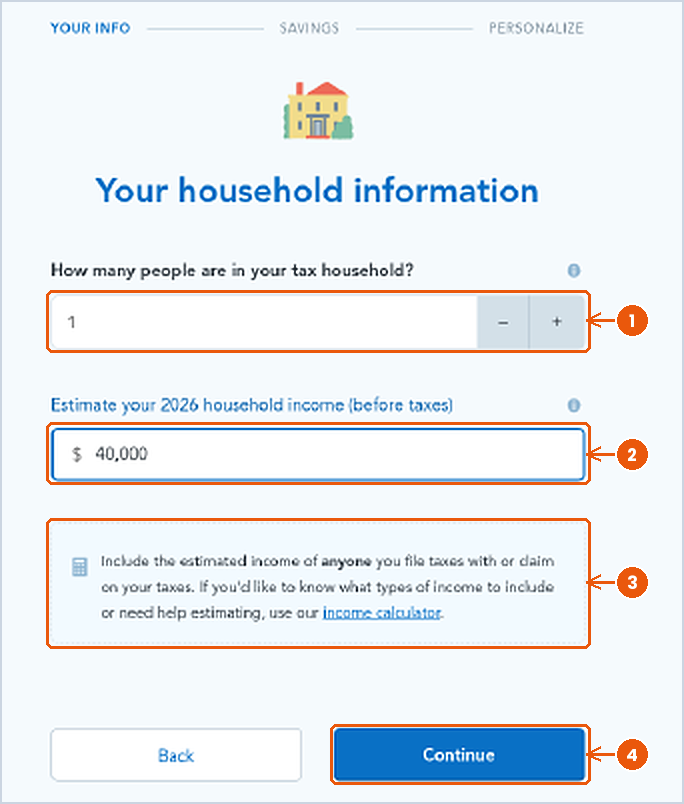
- Tax household size: Use the + and minus buttons. Example: 1.
- Household income (before taxes): Your careful estimate for the year shown. Example: $40,000.
- Help box and income calculator: Explains whose income to include. The income calculator link helps you estimate.
- Continue: Next screen.
Step 5: Your estimated savings
Next you see You may qualify for savings! This is an estimate of the premium tax credit that lowers your monthly premium. In our example the screen showed $364 a month. The results page for next year’s plans showed $456 a month, because savings are figured separately for each plan year. As the screen says: “This is an initial estimate. You’ll see your exact savings when you apply.”

- Estimated monthly savings: How much the tax credit may lower your premium each month.
- Initial estimate: Your exact amount is set when you apply.
Step 6: The life event question (outside Open Enrollment)
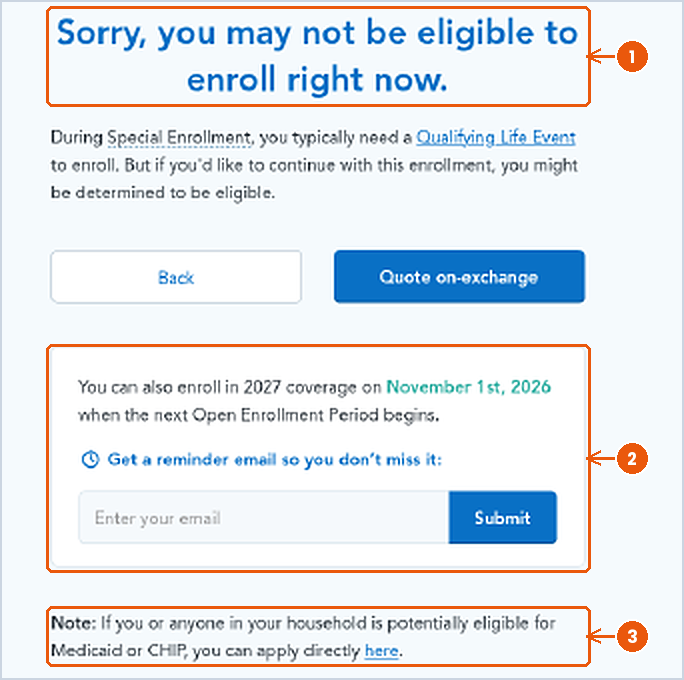
If you use the tool outside Open Enrollment, it asks for a Qualifying Life Event. If you had one in the last 60 days, pick it. If not, choose None of the above. Please do not pick an option that does not apply to you, including Other situations.

Screen 6a
- It’s currently Special Enrollment: Shows up outside Open Enrollment.
- Qualifying Life Events: Pick one only if it really happened to you in the last 60 days.
- None of the above: The right answer if nothing applies.
Screen 6b
- May not be eligible right now: Without a life event you usually wait for Open Enrollment.
- Reminder email: Enter your email to get a reminder for Nov 1, when next year’s enrollment opens.
- Medicaid or CHIP note: If someone in your home may qualify, you can apply for those any time.
Not sure if something counts as a life event? Call or text us at (321) 315-0054 before you go further. We will tell you honestly whether you can enroll now or should wait for Nov 1.
Step 7: Optional, add your doctors and prescriptions
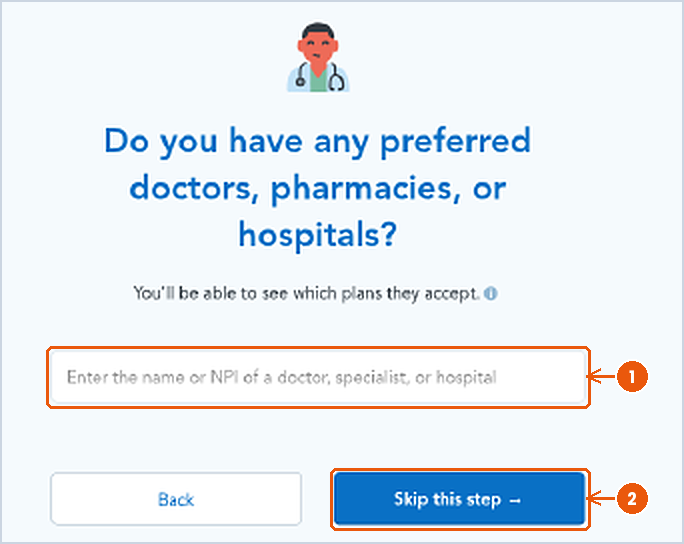
Next the tool asks about doctors, pharmacies, and hospitals, then prescription drugs. Both are optional, and Skip this step works fine. We skipped both in our example, but they are worth a minute if you have doctors or medications you want to keep.

Screen 7a
- Search box: Type a doctor, specialist, or hospital name, or their NPI number.
- Skip this step: Continue without adding anyone.
Screen 7b
- Search box: Type the name of each prescription you take.
- Skip this step: Continue without adding drugs.
Why these lookups matter
- Networks. Every plan in our example is an HMO. HMO plans generally cover care only from doctors and hospitals in the plan’s network, except emergencies. Adding your doctor shows which plans include them.
- Drug lists. Each plan has its own list of covered drugs and its own prices. Adding your prescriptions shows which plans cover them and what they may cost.
- You can also add both later from the results page with Add drugs and Add a doctor or hospital.
Step 8: Read your first results page
Here is the first results page for our example, with every part numbered. The left side holds your filters. The right side shows plan cards, sorted by lowest premium.

- Summary strip and Edit: The ZIP, people, household, and income you entered (32837, 1, 1, $40,000). Tap Edit to change any of them.
- Share, Print, Cart: Send or print this list. Cart holds plans you add.
- Health and Dental tabs: Health plans show first. Dental shows separate dental plans.
- Estimated savings: $456/mo in our example. This estimated tax credit is already subtracted from the prices on the page.
- Monthly premium slider: Hide plans above a monthly price. It tops out at $655 here.
- Deductible slider: Hide plans with a deductible above the amount you pick. Up to $10,150 here.
- Drugs: Add drugs: Add prescriptions to see coverage and cost.
- Providers: Add a doctor or hospital: Add doctors to see which plans have them in network.
- Usage estimate: Low, Medium, or High. Tells the tool how much care you expect to use so it can estimate yearly costs. It does not change a plan’s price.
- Carriers: Insurance companies with plans for you. In this example, one: AvMed, Inc.
- Metal levels: Expanded Bronze, Silver, Gold, Platinum. Check one to show only that level.
- Plan count: 14 plans match. Page 1 shows 10; page 2 has the rest.
- Plan year: Which year’s plans you are viewing. Here, next year’s plans.
- Sort: Lowest premium (default), Lowest deductible, Lowest max out-of-pocket, or In-Network provider.
The yellow tag in the top right corner is ours. The tool’s top bar shows a phone number that is not Instant Health Help’s, so we covered it. Our number is (321) 315-0054.
More filters, and how to use them

- Networks: Filter by network type. Every plan here is an HMO.
- Easy pricing: Shows standardized plans (Standard in the name). They follow a set cost sharing design, so they are easier to compare side by side.
- Eligible for an HSA: Shows plans that work with a Health Savings Account, a tax advantaged account for medical costs.
Using filters and sort together
- Start with metal levels. Check Silver, for example, to see only Silver plans.
- Set your limits. Slide Monthly premium and Deductible down to the most you are comfortable paying.
- Change the sort. Lowest deductible or Lowest max out-of-pocket can bring different plans to the top than Lowest premium.
- Add your doctors and drugs. Then sort by In-Network provider to see plans that include your doctors first.
- Clear filters by unchecking boxes or sliding back to the right, so you do not miss plans by accident.
Step 9: Read a plan card
Each plan gets a card. Here are the first two cards from our example, labeled.
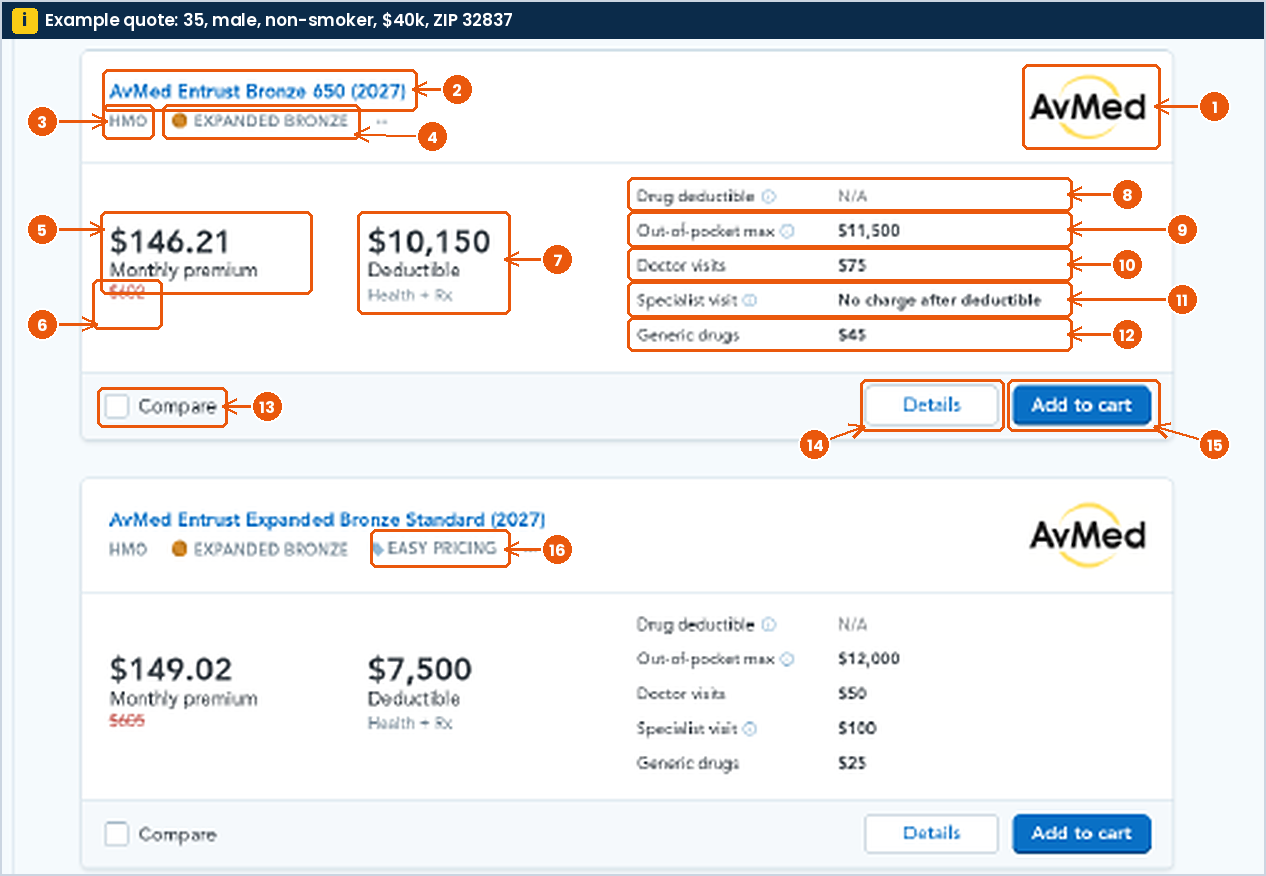
- Insurance company (carrier): AvMed in this example.
- Plan name: AvMed Entrust Bronze 650. Click it to open details.
- Network type: HMO: use doctors and hospitals in the plan’s network.
- Metal level: Expanded Bronze. Metal levels explained below.
- Monthly premium (after savings): $146.21. What you would pay each month with the estimated tax credit.
- Red strikethrough price: $602. The price before the tax credit. The page does not label it, but $146.21 + $456 savings = $602.21.
- Deductible (Health + Rx): $10,150. One combined deductible for medical care and prescriptions.
- Drug deductible: N/A. No separate drug deductible is listed; drugs fall under the combined deductible.
- Out-of-pocket max: $11,500. The most you pay for covered in network care in a plan year.
- Doctor visits: $75 per primary care visit.
- Specialist visit: No charge after deductible: you pay full price until you reach the deductible, then $0.
- Generic drugs: $45 per generic prescription. Check Details for how it applies.
- Compare: Check two or more cards to see them side by side.
- Details: Opens the full plan page (Step 10).
- Add to cart: Saves the plan to your cart for applying. Adding to cart is not enrolling.
- Easy pricing tag: Marks a standardized plan.
About the red strikethrough: the big number is your estimated price after savings. The small red number with a line through it is the full price before the tax credit. Your real savings are confirmed when you apply.
Five cost words, in plain English
Premium vs deductible vs copay vs coinsurance vs out-of-pocket max, using the first plan in our example (AvMed Entrust Bronze 650):
| Term | Plain English | In our example |
|---|---|---|
| Premium | Your monthly bill to keep the plan, whether or not you use care. | $146.21 a month after estimated savings ($602.21 before). About $1,754.52 for a full year. |
| Deductible | What you pay for covered care before the plan starts paying its share. Preventive care and some copays work before the deductible. | $10,150. A specialist visit is full price until you have paid this much. |
| Copay | A flat amount you pay for a visit or prescription. | $75 for a doctor visit, $45 for a generic drug. |
| Coinsurance | A percentage of the bill you pay after the deductible, instead of a flat copay. | Illustration only: 20% coinsurance on a $1,000 bill means you pay $200. Each plan’s real coinsurance is in its Summary of benefits. |
| Out-of-pocket max | The most you pay in a plan year for covered in network care. Deductible, copays, and coinsurance count toward it. Premiums do not. | $11,500. After that, the plan pays for covered in network care for the rest of the plan year. |
Bronze vs Silver vs Gold in this example
A lower premium usually means a higher deductible. Here is the lowest premium plan at each metal level on page 1, plus the range across all page 1 plans in that level.
| Bronze | Silver | Gold | |
|---|---|---|---|
| Plan (lowest premium) | Entrust Bronze 650 | Entrust Silver 550 | Entrust Gold 125 |
| Monthly premium after savings | $146.21 | $289.08 | $387.64 |
| Before savings | $602 | $745 | $844 |
| Deductible (Health + Rx) | $10,150 | $6,250 | $2,000 |
| Out-of-pocket max | $11,500 | $9,000 | $6,500 |
| Doctor visit | $75 | $55 | $35 |
| Specialist visit | No charge after deductible | $110 | $70 |
| Generic drugs | $45 | $45 | $30 |
| Yearly premium + out-of-pocket max | $13,254.52 | $12,468.96 | $11,151.68 |
| Page 1 premium range | $146.21 to $156.30 | $289.08 to $312.90 | $387.64 to $387.74 |
| Page 1 deductible range | $6,500 to $10,150 | $3,500 to $6,400 | $2,000 to $2,500 |
Reading the Bronze, Silver, Gold table
The “yearly premium + out-of-pocket max” row is a planning number: twelve months of premium plus the most you would pay for covered in network care in a rough year. In this example the Gold plan costs more each month but has the lowest total in that scenario. If you rarely see a doctor, the Bronze premium may matter more to you. There is no single right answer, which is why we are happy to talk it through.
All 10 plans on page 1
Scroll down and you will see the rest of page 1. Here are all ten cards in one table (every plan is an AvMed HMO and shows N/A for drug deductible).
| # | Plan | Metal | Premium (before) | Deductible | OOP max | Doctor | Specialist | Generic |
|---|---|---|---|---|---|---|---|---|
| 1 | Entrust Bronze 650 | Exp. Bronze | $146.21 ($602) | $10,150 | $11,500 | $75 | No charge after ded. | $45 |
| 2 | Entrust Expanded Bronze Standard * | Exp. Bronze | $149.02 ($605) | $7,500 | $12,000 | $50 | $100 | $25 |
| 3 | Entrust Bronze 600 | Exp. Bronze | $156.30 ($612) | $6,500 | $11,500 | $70 | $140 | $45 |
| 4 | Entrust Silver 550 | Silver | $289.08 ($745) | $6,250 | $9,000 | $55 | $110 | $45 |
| 5 | Entrust Silver Standard * | Silver | $290.64 ($747) | $6,400 | $10,300 | $40 | $80 | $20 |
| 6 | Entrust Silver 550 Dental+Vision | Silver | $291.73 ($748) | $6,250 | $9,000 | $55 | $110 | $45 |
| 7 | Entrust Silver 350 | Silver | $310.17 ($766) | $3,500 | $10,000 | $30 | $60 | $45 |
| 8 | Entrust Silver 350 Dental+Vision | Silver | $312.90 ($769) | $3,500 | $10,000 | $30 | $60 | $45 |
| 9 | Entrust Gold 125 | Gold | $387.64 ($844) | $2,000 | $6,500 | $35 | $70 | $30 |
| 10 | Entrust Gold Standard * | Gold | $387.74 ($844) | $2,500 | $8,600 | $30 | $60 | $15 |


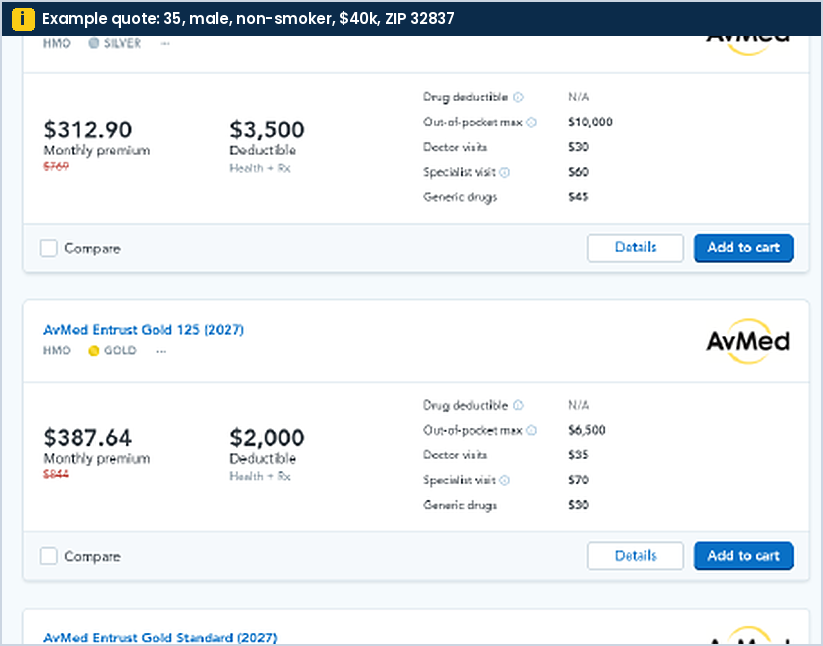
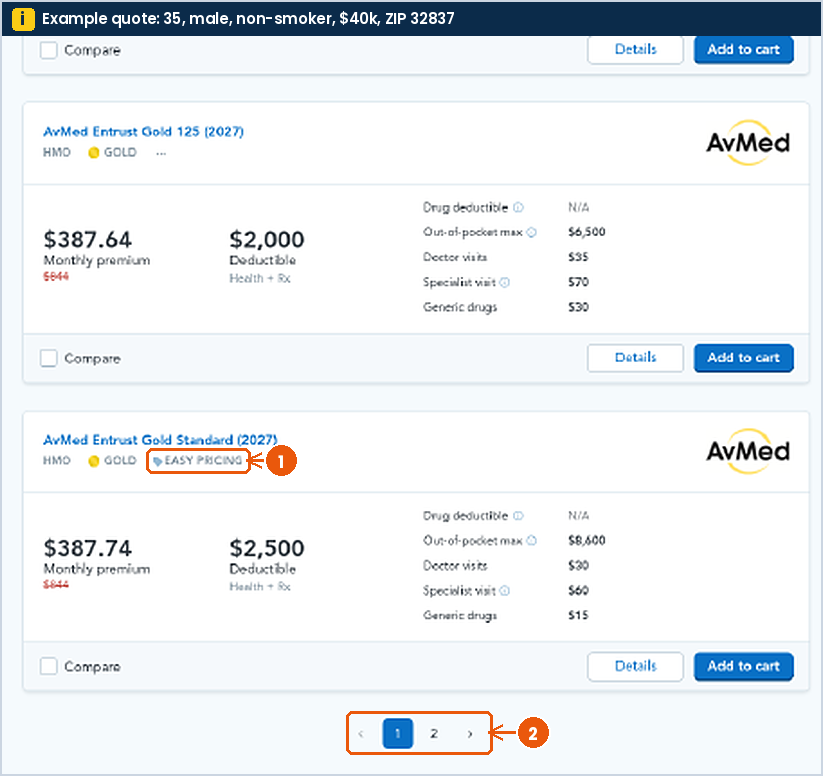
- Easy pricing tag: Gold Standard is a standardized plan.
- Pagination: Page 1 shows 10 of 14 plans. Tap 2 or the arrow for the rest.
Step 10: What the plan detail page shows
Tap Details on any card to open the full plan page. Here is the page for card 1, AvMed Entrust Bronze 650.

- Show all plans: Back to the full list.
- Add to cart: Save this plan for applying.
- Go back: Return to the previous page.
- Section menu: Overview, Doctor visits, Drug coverage, Labs, Hospital, Other coverage, Pregnancy & birth, Preventive care.
- In network toggle: Shows your costs for in network care. Switch it to see out of network costs.
- Monthly premium: $146.21, shown with the before savings price $602.21 struck through.
- Deductible (Health + Rx): $10,150 per person.
- Out-of-pocket max: $11,500 per person.
- Network: HMO.
- Metal tier: Expanded Bronze.
- Overall rating: Not rated: no quality rating is available for this plan yet.
- Plan documents: Summary of benefits, Drug directory, Plan brochure. Read the Summary of benefits before you choose.
- Before and after deductible table: Primary care: $75 before and after. Specialist: full price before, no charge after. Preventive care: no charge.

Tips before you choose
- Look past the premium. Compare the deductible and out-of-pocket max too.
- Add your doctors and prescriptions so you can see what is covered.
- Open the Summary of benefits for any plan you are serious about.
- Use Compare to line up two or three plans side by side.
- Remember the savings number is an estimate until you apply.
Ready to apply? We will help
Found plans you like? Let’s apply together.
Call or text (321) 315-0054, or tap Talk to a licensed agent. A licensed agent will review the plans you picked, check your doctors and prescriptions, and help you apply. There is no extra cost for our help.
Call (321) 315-0054Text usTalk to a licensed agent
Mon to Fri 8 am to 5 pm, Sat 9 am to 3:30 pm ET · agent@inshh.com
Instant Health Help is a licensed insurance agency, not the Health Insurance Marketplace or HealthCare.gov. The quoting tool is powered by HealthSherpa and is not the government Marketplace website. Plan names, prices, and savings shown are examples for one profile (35, male, non-smoker, household of 1, $40,000 income, ZIP 32837) on the day captured. Your results will differ. Savings are estimates until you apply. Plan availability and benefits can change. Open Enrollment dates are for states that use HealthCare.gov, including Florida.